






Astro and Next.js both provide prefetching features, but their approaches are quite different. In this article, I will first cover the basic concept of Prefetch, then compare how each framework implements it, how it is used, and what their design choices reveal.
What is Prefetch?
Simply put, Prefetch means loading and caching content ahead of time for pages or resources the user is likely to visit. By doing this before the actual user request, the browser can reduce the amount of work needed at navigation time, which shortens the time until the next page is displayed.
I have written about Prefetch from a few different angles before. If you are interested, please take a look at these articles too.
Prefetch is Not a Silver Bullet
I just described the benefit of Prefetch as improving the user experience by reducing the time until rendering. However, Prefetch is not a magic feature. The reason is simple: it is difficult to prefetch in a way that actually improves the user experience.
Predicting user behavior and only prefetching content that will meaningfully improve the experience is almost like trying to see from above. In reality, we need a strategy. We need to look at analytics, study user behavior, and prioritize the pages or resources that are both commonly used and likely to have a meaningful effect when prefetched.
It is obvious that Prefetch is not useful if it does not improve the user experience. But why does it need to be strategic? Because if we prefetch every possible link without thinking, we can increase unnecessary network traffic and compete with more important requests.
- Unnecessary network traffic: If we load pages the user never opens, those downloads are wasted.
- Competition with important requests: If images, API responses, fonts, or other resources needed by the current page are loading at the same time, the browser and network may have to divide resources, which can make important loading work slower.
For a small project where linked content is static and mostly text, the cost may not be very high. But what if the linked content is dynamic, personalized, visually heavy, includes large videos, or has a large page size? In that case, it is easy to imagine Prefetch becoming expensive.
So Prefetch is not universally good. But if we look at it through the question, how does each framework try to solve these problems?, the implementation details become much more interesting.
Astro Prefetch
For a detailed overview of Astro Prefetch, the official Astro guide and my earlier articles linked above should be useful.

There may be some overlap with those articles, but I would summarize Astro Prefetch as an opt-in feature for making MPA navigation feel faster by loading the next page before the user performs the final navigation action.
In practice, Astro targets internal links with data-astro-prefetch, prefetches them using triggers such as hover, tap, viewport, and load, and behaves conservatively on slower connections.
How Astro Implements Prefetch
Astro Prefetch is implemented as an extension of browser prefetching behavior. The core flow can be summarized as follows:
- Normalize the URL
- Check whether the URL can be prefetched, taking into account the user’s network/data conditions and the origin
- If prefetching is allowed, use one of the following methods in fallback order:
- Insert
<script type="speculationrules">when the Speculation Rules API is available - Insert
<link rel="prefetch"> - Fall back to
fetch()
- Insert
The key point is that Astro builds its prefetching capabilities by leveraging browser APIs. By using mechanisms such as the Speculation Rules API, Astro can benefit from browser-level optimization and control instead of managing every scheduling detail itself.
Basic Usage
Astro Prefetch can be enabled by setting prefetch: true in the Astro config.
import { defineConfig } from 'astro/config';

export default defineConfig({
  prefetch: true,
});
If you want to enable Prefetch for an individual link, add the data-astro-prefetch attribute.
<a href="/target" data-astro-prefetch>Go to target</a>If you want every internal link in the project to become a Prefetch target, set prefetchAll: true inside the prefetch config.
import { defineConfig } from 'astro/config';

export default defineConfig({
  prefetch: {
    prefetchAll: true,
  },
});
Astro also lets you choose from four trigger options. The default is hover.
- hover: Fetch when the link is hovered or focused
- tap: Fetch immediately before click or tap
- viewport: Fetch at low priority when the link enters the viewport
- load: Fetch all links at low priority after the page finishes loading
If you want Prefetch enabled while avoiding unnecessary network traffic as much as possible, I think tap is a good option. It runs immediately before the user actually clicks, so it can reduce wasted prefetches.
The trigger logic looks roughly like this:
hover: Starts fromfocusinormouseenter, then prefetches after 80ms. It cancels onfocusoutormouseleave.tap: Starts fromtouchstartormousedown.viewport: Watches targets withIntersectionObserver, then prefetches after 300ms of continued intersection. It cancels when the link leaves the viewport, and unobserves after execution.load: Prefetches target links one by one afteronPageLoad.
As a side note, Astro also has experimental support for using the Speculation Rules API. As mentioned earlier, Astro Prefetch is enabled through the prefetch config, and by setting clientPrerender to true, Prefetch using the Speculation Rules API can also be enabled.
Next.js Prefetch
Next.js Prefetch is also a feature for improving the user experience. However, its approach is different from Astro’s. In Next.js, Prefetch is mainly handled through the next/link component. By using next/link, Next.js can prefetch page code and data when the user approaches a link or when a link becomes relevant, making navigation faster.
How Next.js Implements Prefetch
The internal flow behind Prefetch with next/link and the <Link /> component can be summarized like this:
- Register the target link when
<Link>mounts, and observe it with IntersectionObserver - Schedule a Default-priority prefetch when the link enters the viewport
- Raise the priority to Intent on hover or touch
- Process the queue through a scheduler that controls priority and concurrency
Priority and Concurrency
Priority and concurrency are Next.js-specific concepts that do not appear in Astro Prefetch in the same way.
- Priority: Determines which Prefetch work should be handled first. The levels are
Intent > Default > Background. - Concurrency: Limits how many requests can be sent at once. In the Next.js v16.1.6 implementation referenced by the original article, Intent has a limit of 12 and Default has a limit of 4.
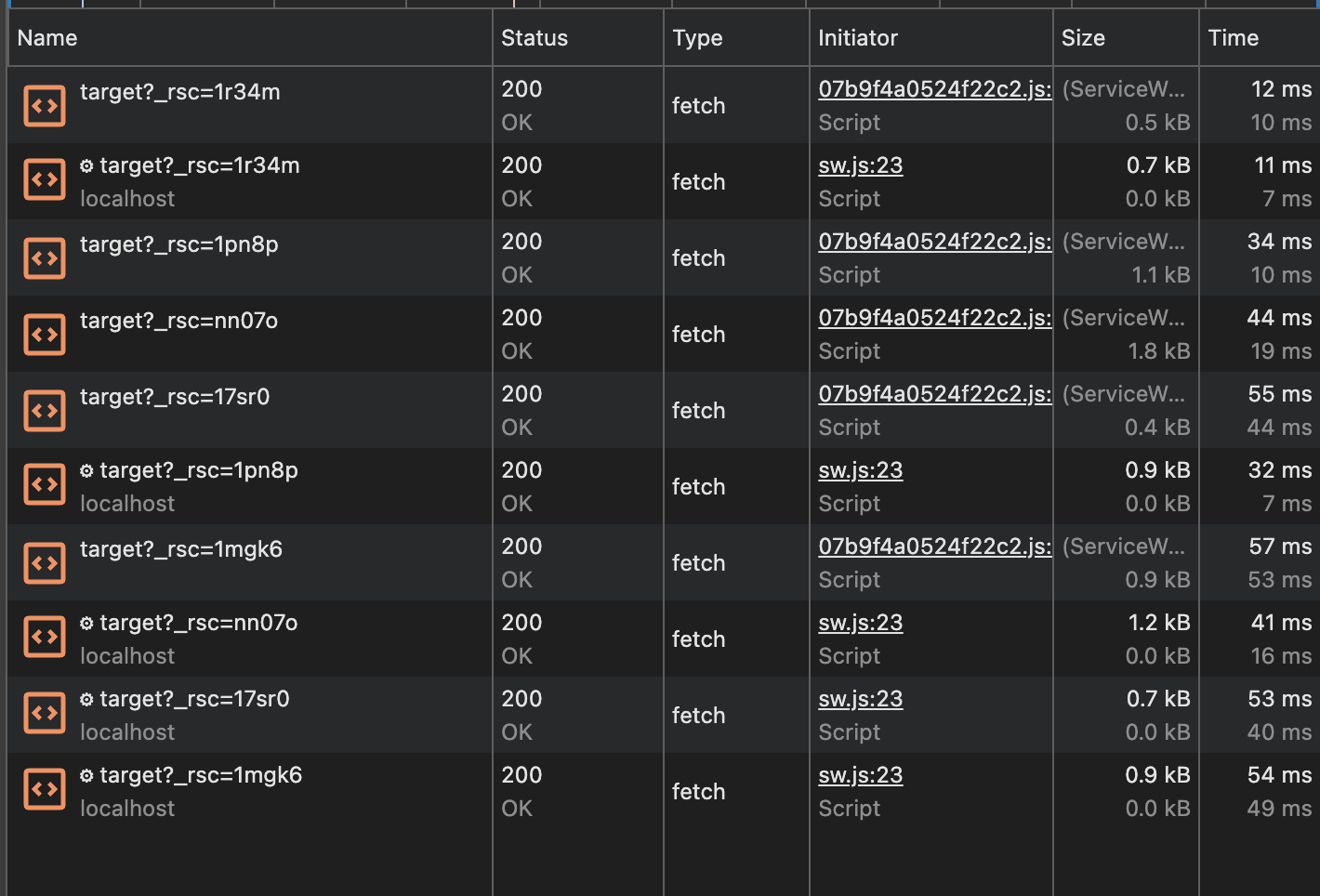
Because Next.js fetches at the RSC segment level, one link prefetch can easily involve multiple requests. Without connection limits, the browser’s network queue could become crowded. The most important thing is to prefetch the link the user will actually visit, even though 100% accuracy is not realistic. It would not be desirable for unnecessary fetching to degrade application performance.
Personally, I find the scheduler in step 4 especially characteristic of Next.js. It controls Prefetch-related state in considerable detail. It is also interesting that the way segments are sent can change depending on whether PPR is involved.
Basic Usage
In Next.js, you import next/link and use the <Link> component. By default, that link becomes a Prefetch target.
import Link from 'next/link';

export default function Page() {
  return <Link href="/home">Home</Link>;
}
By default, Next.js prefetches when the link enters the viewport. You can also explicitly configure this behavior with the prefetch prop. If prefetch={false} is set, Prefetch is fully disabled both on viewport entry and hover.
When the prefetch prop is omitted, which corresponds to the default null behavior, the behavior differs depending on whether the destination route is static or dynamic. Static routes are fully prefetched. Dynamic routes are partially prefetched up to the nearest loading.js boundary. This segment-level partial Prefetch is a sharp contrast with Astro’s full HTML-document approach.
import Link from 'next/link';

export default function Page() {
  return (
    <Link href="/home" prefetch={false}>
      Home
    </Link>
  );
}
Comparing Astro and Next.js Prefetch
Now that we have looked at both implementations, let’s organize the differences.
| Comparison point | Astro | Next.js |
|---|---|---|
| Implementation approach | Extends browser APIs: Speculation Rules API when experimental support is enabled, then <link rel="prefetch">, then fetch() fallback | Framework-owned logic, using fetch inside the router |
| Trigger and control | Default is hover; also supports tap, viewport, and load options | Default is prefetch="auto" or equivalent omitted behavior; prefetch prop can also be true or false |
| Prefetch target | HTML, usually page-level | RSC Payload, usually layout-segment-level |
| Network-awareness | Yes. It automatically falls back toward conservative behavior on slow connections or Data Saver | Limited. Prefetch is suppressed when Data Saver is enabled |
As the table shows, there are many differences in implementation style, trigger control, developer-facing flexibility, what gets loaded, and how network conditions are considered.
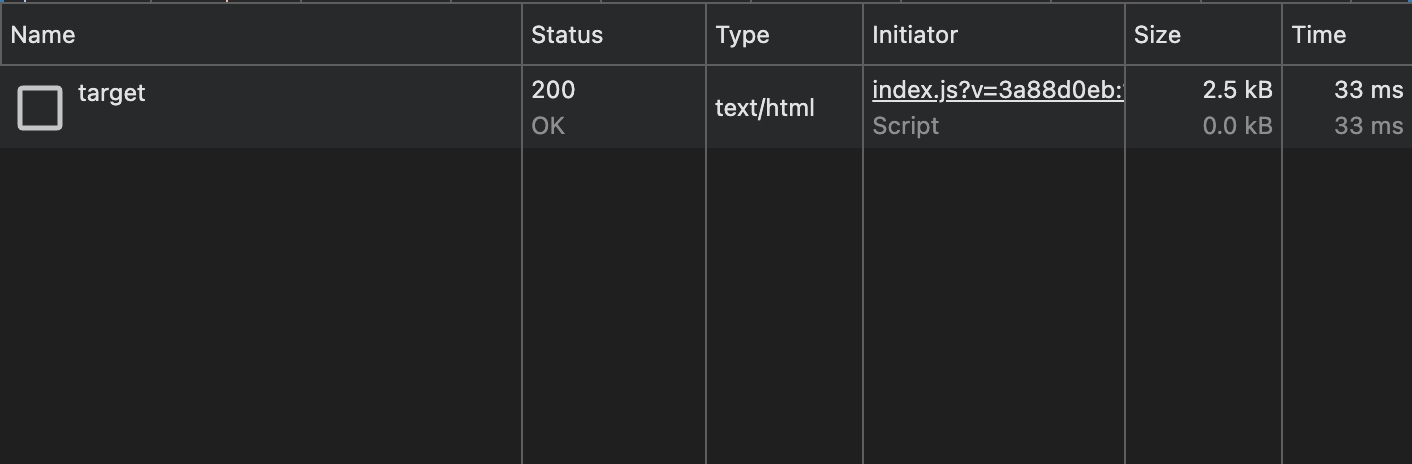
The difference in Prefetch target is especially important for network cost. Astro prefetches mainly HTML at the page level, so the design is simple and page size maps directly to transferred data. Next.js fetches RSC Payload at the layout segment level, which can avoid re-fetching shared layout parts. However, depending on the route structure, it may also produce multiple requests per segment, making concurrency control important.
The first image below shows Astro Prefetch, and the second shows Next.js Prefetch.
Astro and Next.js take different approaches, but both are focused on improving application performance and user experience together.
Summary
In this article, I compared Prefetch in Astro and Next.js, focusing on how each framework implements it and what kind of design philosophy appears behind those choices.
Prefetch can make navigation faster by loading likely next pages ahead of time. But it is not a silver bullet. It can also introduce performance risks through unnecessary network traffic. Astro and Next.js address that challenge in different ways.
Astro uses browser-standard APIs such as <link rel="prefetch"> and the Speculation Rules API, and its design is simple: prefetch HTML at the page level. It also aligns with browser-level behavior around network conditions, such as falling back under slower connections.
Next.js, on the other hand, builds a framework-owned scheduler and priority queue around next/link, and prefetches RSC Payload at the segment level. Since multiple requests can happen for a single link, it includes more detailed resource control, such as concurrency limits and priority levels like Intent, Default, and Background.
I do not think the point is that one is simply better than the other. Their approaches differ because their architectures and philosophies differ. Astro keeps Prefetch simple by relying on the browser. Next.js controls Prefetch precisely through its own router and scheduler. Both are aiming at the same goal: maximizing performance and user experience, but through different paths.
References
These are the references used in the article, including resources already mentioned above.
- プリフェッチから学ぶWebパフォーマンスの最適化
- Astroはなぜ速い?プリフェッチの内部実装を追う
- Speculation Rules API から見るブラウザのプリフェッチ戦略
- Prefetch | Astro Docs
- Experimental client prerendering | Astro Docs
- Astro Prefetch hover logic | GitHub repository
- Astro Prefetch tap logic | GitHub repository
- Astro Prefetch viewport logic | GitHub repository
- Astro Prefetch load logic | GitHub repository
- Next.js Link component | Next.js Docs
- Next.js link | GitHub repository
- Next.js link component logic | GitHub repository
- Next.js scheduler | GitHub repository
- Next.js utilities | GitHub repository